
Grounded ESP: Players, Bases, Stashes and Resources
Understand what Grounded ESP displays and how player, base, stash and resource information serve different tasks.
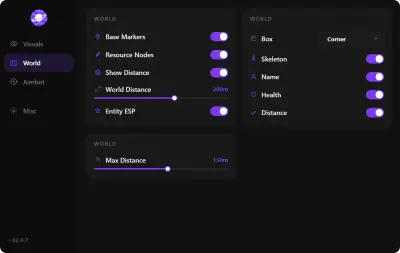
ESP adds an information layer to the game screen. In Grounded Cheats, the documented locations cover players, bases, stashes and gather nodes. Each group answers a different question: where other players are, where resources are stored and where materials can be gathered. Understanding those roles is more useful than assuming the overlay has every feature found in other tools.
Player information during a session
Player ESP brings information about other players onto the screen. That helps you follow where they are while choosing where to move. Use those positions to orient the session and distinguish player tracking from the gathering tasks covered by resource ESP. The main feature breakdown explains the roles of each information layer.
Bases and stashes for stored resources
Player and base ESP also covers stashes. Use that information when the task is finding where resources are held rather than collecting fresh materials. It saves checking each possible location by hand. A marked stash is information for your route; it does not by itself promise automatic interaction, inventory contents or a way to collect items remotely.
Resource ESP for a gathering route
Resource ESP marks gather nodes on screen. Start with the materials needed for your current crafting or building task and use the available location information to choose a gathering route. Keep this purpose separate from stash tracking: nodes are places to gather materials, while stashes hold stored resources. The product does not document automatic gathering or a list of resource filters.
ESP and aim assistance have different jobs
ESP supplies visual information, while aim assistance supports ranged targeting in PvP situations. Finding a player and aiming at one are separate tasks. Use ESP when you need location context, and read the aim feature as support for the targeting part of a fight. Both roles are explained on the product page.
Save the setup and check the capture
Configs can be saved per server, so keep the setup associated with the server where you use it. Read the config guide for a practical way to organize them. If you record gameplay, test the stream-proof mode with your actual capture program. Cloud DMA and the Windows security requirements still apply to the full product.