
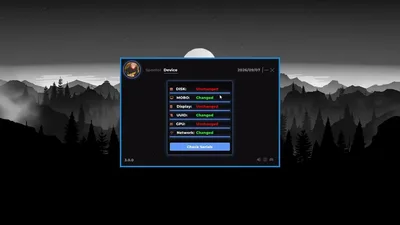
HWID Spoofer: Windows Preparation Checklist
Prepare Windows, confirm title support and understand the identifier-change and cleanup sequence before using HWID Spoofer.
A useful HWID Spoofer setup starts with the intended game and the PC that will run it. Confirm compatibility before changing identifiers. The utility has its own license and instructions; purchasing Grounded Cheats does not include it or establish that the two products work together. This checklist helps you prepare the information and settings needed for the supplied guide.
Confirm the title and current build
Read the HWID Spoofer overview and ask support about your exact title and build before purchase. Coverage notes naming an anti-cheat system do not confirm every game that uses it. Grounded compatibility is unconfirmed. Record the error you are investigating, since a failed login alone does not identify a hardware restriction.
Check Windows and security settings
The documented requirements are 64-bit Windows 10 or 11, administrator rights, and internet access for activation and updates. HVCI and Core Isolation must be enabled in Windows Security. TPM and Secure Boot must be enabled in firmware. Use the current instructions for this utility rather than applying security changes from a guide for another product.
Keep identifier changes and cleanup in order
The product changes disk serials, MAC addresses, GPU identifiers and related hardware fingerprints. Trace cleanup is included. Follow the supplied sequence: change identifiers, run the cleaner, then open the game client. Use the supplied guide for the actual operations. The presence of a cleaner does not mean it can restore a sanctioned account; read the hardware and account restriction guide to understand that distinction.
Prepare a clear support request
If a step fails, stop at that step and write down the exact message. Send your order ID, Windows version, intended game and build through Support. Describe whether the failure occurred during activation, identifier changes, cleanup or game launch. That gives support a specific starting point. Publisher rules can prohibit spoofing, and changing identifiers does not guarantee protection from account action.